
Analysis of OpenClaw: Opening Door Multi-Agent Ecosystem in Real World Use-Cases
A Technical Analysis in Architectural, Security, Economical Perspective

The transition from generative language models as conversational interfaces to autonomous agentic systems represents a fundamental shift in the landscape of computational agency. At the center of this evolution is OpenClaw, a framework designed to bridge the gap between abstract reasoning and concrete system execution. Originally conceptualized as Clawdbot and subsequently rebranded under the names Moltbot and OpenClaw, this open-source project has emerged as a primary reference architecture for sovereign AI agents. Unlike vendor-locked cloud assistants, OpenClaw is engineered for local-first deployment, prioritizing the containment of data and execution within a user-controlled trust boundary. The rapid viral adoption of the platform, accruing over 180,000 GitHub stars within a narrow temporal window, underscores a growing systemic demand for agents that can proactively manage hardware, interact with the command line interface (CLI), and orchestrate complex workflows across heterogeneous application ecosystems. As summary, the developer of this project did great job; I just only want to evaluate / analyze in terms of Architectural, Security and Economical perspectives.
Systemic Architecture
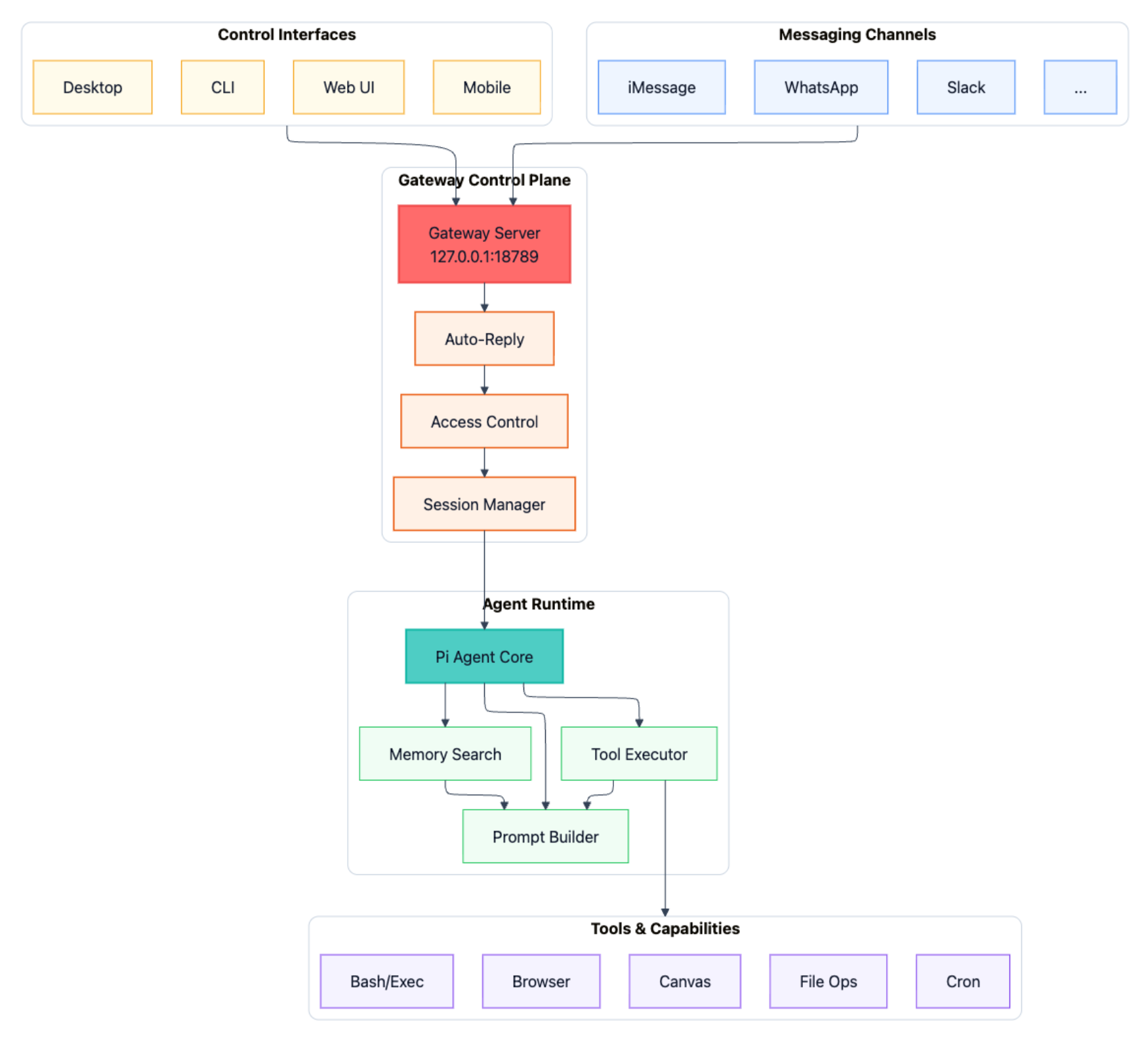
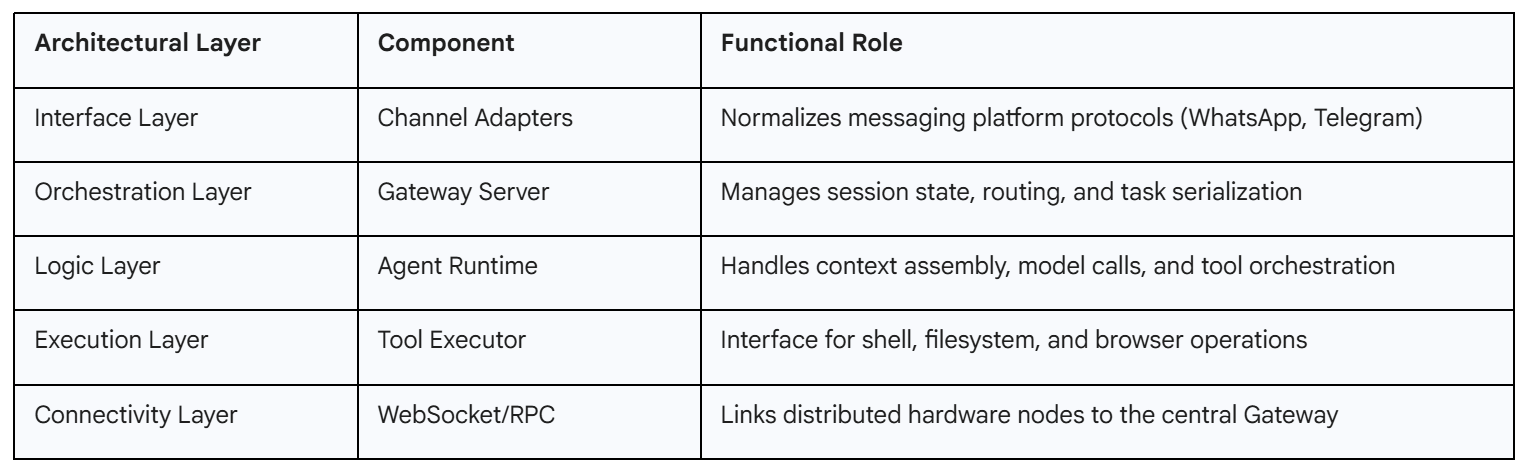
The architecture of OpenClaw is built upon a central control plane known as the Gateway, which functions as a long-lived Node.js process responsible for managing the lifecycle of agentic sessions. This gateway-centric design facilitates a modular environment where communication channels, model providers, and tool execution engines are decoupled, allowing for extreme extensibility and provider-agnosticism.
The Gateway Control Plane and WebSocket Network
The primary operational hub of the OpenClaw system is the Gateway server, which typically listens on port 18789 and serves as the single point of entry for all system interactions. This server manages a WebSocket network that connects various “nodes”, distributed execution points that can reside on macOS, Linux, iOS, or Android devices. These nodes utilize a protocol-based capability advertisement system, where they describe available resources, such as file system access, hardware sensors, or screen recording, to the Gateway via the node.list and node.describe methods. This architecture allows OpenClaw to function as a distributed nervous system for personal automation, where the central agent can reach out to multiple physical devices to gather context or execute commands.
Lane Queueing and Serialized Task Execution
One of the most significant technical innovations in OpenClaw is the “Lane Queue” system, designed to address the inherent instability of traditional agent frameworks. Conventional agentic loops often suffer from race conditions and state corruption when multiple asynchronous tasks interleave. OpenClaw mitigates this by enforcing a serial-by-default execution model within a given session or lane. The system ensures that an agent completes its entire loop, from perception and decision-making to multi-step tool execution, before initiating a subsequent turn. Parallelism is reserved for explicitly marked, low-risk, or idempotent background tasks, such as heartbeat monitoring or scheduled data synchronization. This architectural choice dramatically improves the reliability of the system, ensuring that tool outputs are treated as immutable evidence before the agent proceeds with further reasoning.
Semantic Snapshots and Vision-Language Grounding
OpenClaw differentiates its web browsing and computer use capabilities through a technique known as “Semantic Snapshots”. While other computer-use agents rely heavily on visual grounding via expensive and latency-prone screenshots, OpenClaw prioritizes a structural representation derived from the web accessibility tree. By converting a visual webpage into a structured text tree:
- button “Sign In” [ref=1]
- textbox “Email” [ref=2]
- textbox “Password” [ref=3]
- link “Forgot password?” [ref=4]
The agent can interact with the DOM using precise reference nodes rather than guessing pixel coordinates. This approach results in an extreme reduction in token consumption, often shrinking a 5MB screenshot down to a 50KB text representation, while simultaneously increasing the accuracy of agent-driven navigation.
The Multi-Agent System (MAS) Paradigm
The complexity of contemporary digital tasks necessitates a shift from monolithic agents to coordinated multi-agent systems. OpenClaw provides a robust framework for managing both temporary sub-agent spawning and persistent multi-agent teams.
Sub-Agent Orchestration and Task Delegation
The framework allows a primary agent to dynamically spawn sub-agents to handle specialized or computationally intensive sub-tasks. These sub-agents are managed via the sessions_spawn tool and the /subagents debug command. For instance, a main agent tasked with generating a comprehensive business report might spawn a researcher sub-agent to scrape competitor data and a writer sub-agent to draft specific chapters. These sub-agents operate in isolated contexts, preventing the primary context window from becoming overloaded with irrelevant intermediate reasoning.
Persistent Multi-Agent Routing
For enterprise and complex personal workflows, OpenClaw supports persistent multi-agent routing. This configuration allows for the creation of distinct agents with separate workspaces, memory files, and credential stores. Inbound messages from messaging platforms like Slack or WhatsApp are routed to specific agents based on sender identity or target channel. This separation of concerns allows for specialized “Expert Agents”, such as a dedicated coding agent, a system administrator agent, and a personal concierge, to coexist within the same Gateway infrastructure without context leakage.
CLI-Based Computer Management
One of OpenClaw’s core value propositions is its ability to interact directly with the host operating system via the command line interface. This capability transforms the AI from a purely digital advisor into a functional system administrator.
File System Operations and Shell Execution
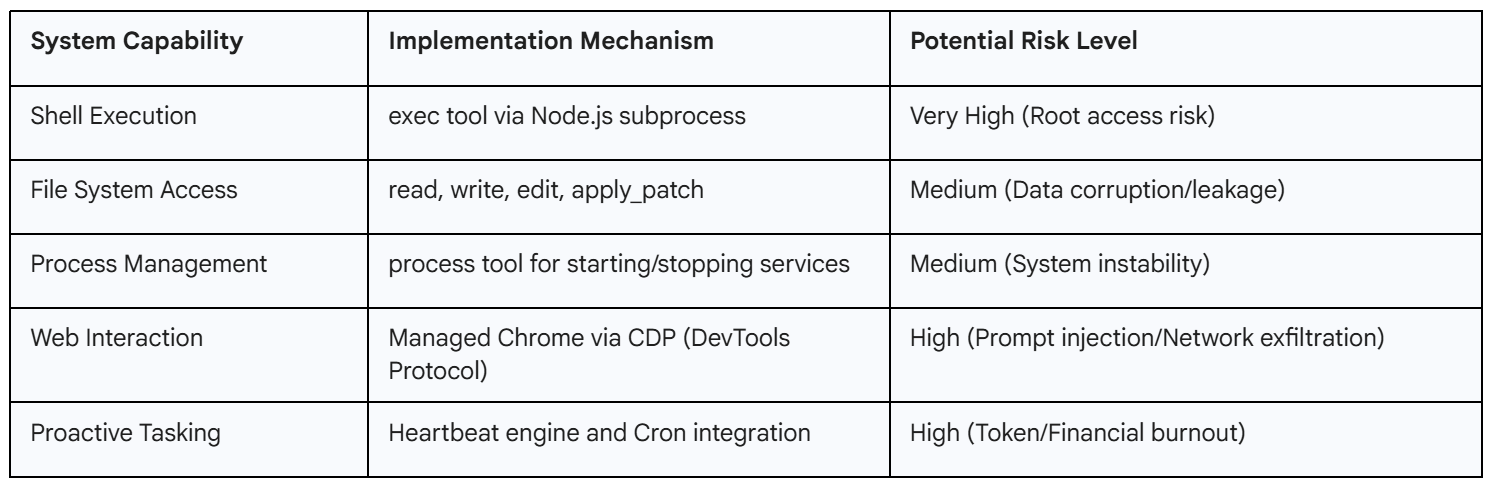
OpenClaw grants agents the ability to read, write, and organize local files with high precision. Through the exec tool, agents can install software dependencies, run scripts, and manage system processes. This agency is managed by a two-tiered permissions model, where users can choose to run the agent with full host access or within a restricted sandbox. Use cases for this include automated log analysis, where an agent can be tasked to monitor a specific directory and identify JSON parsing errors, extracting stack traces for the user’s review.
Proactive System Monitoring and the Heartbeat Engine
Unlike reactive chatbots, OpenClaw features a proactive “Heartbeat Engine”. This engine allows the agent to wake itself up at specified intervals (e.g., every 30 minutes) to check system metrics or external triggers. The agent reads a checklist from a HEARTBEAT.md file, which might include instructions to monitor Linux disk space, check CI/CD pipeline statuses, or scan emails for urgent keywords. If a condition is met, the agent initiates contact with the user via a messaging platform like Telegram or WhatsApp, providing the relevant data and suggesting a course of action.
Model Context Protocol & Tool Integration
OpenClaw utilizes Model Context Protocol (MCP) to expose local and remote resources as discoverable capabilities for the agent.
Standard Primitives of the MCP Framework
MCP establishes three core primitives that allow servers to define their interaction model for AI hosts:
Tools: Standardized function definitions that the agent can call to perform actions, such as create_lead in a CRM or send_slack_message.
Resources: Static or dynamic data sources that the model can read to gain context, such as a database schema or local file contents.
Prompts: Reusable templates that guide the model in specific workflows, acting as pre-built “mental models” for the AI.
Dynamic Discovery and Unified Management
The advantage of MCP in the OpenClaw ecosystem is dynamic discovery. Rather than requiring hard-coded integrations for every tool, the OpenClaw Gateway can connect to any MCP server and automatically ingest its capabilities. This is facilitated by the MCP Adapter plugin, which maps MCP tools to native OpenClaw tools. Practical setups often involve using an MCP Gateway layer to harden the connection, allowing for the injection of secrets at runtime and the maintenance of a detailed audit log for all tool calls.
Security Infrastructure and Risk Mitigation
The expansive capabilities of OpenClaw have led security researchers to identify it as a significant attack surface. As an agent capable of system-level actions, its security posture is a critical concern for both individuals and organizations.
Analysis of High-Severity Vulnerabilities (CVEs)
Early iterations of OpenClaw were plagued by critical vulnerabilities that allowed for remote code execution (RCE).
CVE-2026-25253 (CVSS 8.8): This vulnerability allowed for “1-Click RCE” through authentication token exfiltration. The Control UI blindly accepted a gatewayUrl from a query string and auto-connected via WebSocket, transmitting the stored gateway token to an attacker-controlled server. Using this token, an attacker could bypass authentication, modify tool policies to disable sandboxing, and execute shell commands on the host machine.
CVE-2026-25157 (CVSS 7.7): An OS command injection vulnerability was discovered in the SSH node command functionality. Attackers could supply malicious project paths containing shell metacharacters, leading to arbitrary command execution when the system attempted to process directory changes.
CVE-2026-25475 (CVSS 6.5): A path traversal flaw in the isValidMedia function allowed agents to read arbitrary files from the system, including sensitive data like /etc/passwd or SSH keys, by bypassing path validation checks.
The Problem of Network Exposure (0.0.0.0 Binding)
A foundational security risk in OpenClaw’s initial deployments was the default network binding. Early versions often bound the Gateway to 0.0.0.0, making it accessible on all network interfaces, including the public internet. This exposure, combined with the agent’s shell and filesystem access, turned misconfigured instances into potent AI backdoors. Security scans identified over 135,000 exposed instances, a significant portion of which remained unpatched even after the release of security fixes in version 2026.1.29.
Malicious “Skills” and Supply Chain Threats
The OpenClaw ecosystem is extended through a community-driven marketplace for “skills”. However, this marketplace (ClawHub) has been targeted by attackers who publish malicious skills designed to infiltrate user systems. Some “top-downloaded” skills were found to be malware delivery vehicles for the Atomic macOS Stealer, which targets browser cookies, saved credentials, and developer tokens. These skills often used prompt injection techniques to force the agent to bypass internal safety guidelines and execute exfiltration commands without user awareness.
Operational Governance
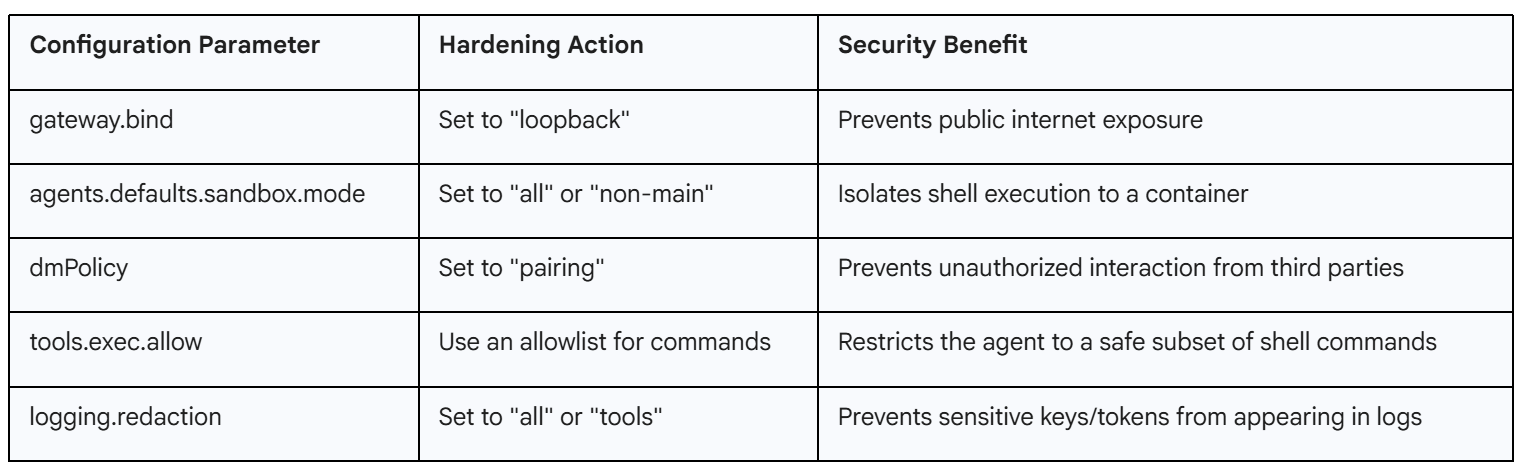
To secure OpenClaw for production or personal use, users must move beyond the default “QuickStart” configuration and implement a multi-layered defense strategy.
The Security Audit Tool
OpenClaw includes a built-in security audit command that scans for common “footguns” and misconfigurations. Running openclaw security audit --fix automatically applies critical hardening steps, such as tightening filesystem permissions (chmod 700 for the home directory and 600 for config files) and turning on sensitive log redaction.
Network Hardening & Identity Management
The most effective network security measure is restricting the Gateway to loopback binding (127.0.0.1). For remote access, the use of VPNs like Tailscale is recommended, as it allows OpenClaw to verify user identity via Tailscale headers rather than exposing public authentication endpoints. Furthermore, “DM Pairing” is enabled by default to ensure that the agent only responds to approved contacts. Unknown senders are presented with a pairing code and are ignored until the user explicitly approves them via the CLI.
Containerized Sandboxing Modes
OpenClaw supports three primary modes for Docker-based sandboxing to limit the “blast radius” of the agent’s actions:
Off: No isolation; high risk.
Non-Main: Recommended for most; sandboxes group chats and external platforms while the main terminal remains uncontainerized.
All: Maximum safety; every session is containerized, though this may introduce higher latency.
Workspace access can be further constrained to read-only (ro) or completely isolated (none) to prevent the agent from modifying critical user files.
Economic Analysis of Agentic Workflows
While the software itself is open-source and free, the operational costs associated with autonomous agents can be significant, primarily due to the volume of API tokens required for persistent, multi-step workflows.
Token Consumption, Context Management
Autonomous agents are notably token-intensive because they maintain long-term conversation history and system context. Every turn in a conversation typically involves resending the system prompt (which can be 10,000 tokens), tool descriptions, and past session history. Real-world tests have shown that an automated task can “burn” millions of tokens in a single session, leading to unexpected API bills in the hundreds or even thousands of dollars.
Caching and Model Tiering Strategies
To manage these costs, OpenClaw supports Anthropic’s prompt caching, which can reduce the cost of context reuse by up to 90%. Users are advised to set up “Heartbeat” intervals slightly shorter than the cache Time-To-Live (TTL) to keep the cache “warm” and minimize re-processing fees. Furthermore, the system allows for multi-model fallback chains, where a high-cost reasoning model (e.g., Claude Opus) is used only when necessary, while routine monitoring or formatting tasks are handled by cheaper, faster models like Gemini Flash.
Installation
The successful deployment of an OpenClaw instance involves a sequential process of installation, channel integration, and capability expansion. For testing/usage, you can use Virtual Machines (VMs) for the security.
Installation and The Onboarding Wizard
The recommended installation method uses a shell script that detects the host environment and installs Node.js dependencies. The command openclaw onboard --install-daemon launches an interactive TUI (Terminal User Interface) that guides the user through the selection of AI providers (Anthropic, OpenAI, or local models via Ollama) and the configuration of messaging channels.
Channel Setup: The Telegram Example
Connecting to a messaging platform like Telegram involves creating a bot via the Telegram @BotFather and providing the resulting API token to the OpenClaw wizard. Once the Gateway is started (openclaw gateway run), the user sends an initial message to the bot, which responds with a pairing code. Approving this code via the terminal (openclaw pairing approve telegram <code>) establishes the secure link, enabling the user to interact with their system from their mobile device.
Extending Capabilities with Custom Skills
Skills in OpenClaw are defined as JavaScript or TypeScript functions that reside in the skills/ directory. Each skill requires a SKILL.md or skill.json file that provides a natural language description and a schema for its parameters, enabling the AI to understand when and how to invoke it. This extensibility allows developers to build custom integrations for specialized hardware or proprietary internal APIs, which are then loaded into the Gateway upon restart.
Future Outlook
As OpenClaw moves toward more mature versions (e.g., 2026.2.3), the focus is shifting from experimental features to systemic stability and “Stabilisation Mode”. Future iterations are expected to deepen the integration with the Model Context Protocol, enabling more granular control over multi-agent teams and reducing the manual burden of integration. The emergence of sovereign AI environments, where users maintain absolute control over their digital employees, is likely to redefine the relationship between humans and their computational tools, moving toward a model where the AI assistant is a trusted, 24/7 partner in both professional and personal spheres. However, the continued success of this model will depend heavily on the ability of the open-source community to address the significant security and economic challenges inherent in high-agency autonomous systems.
References
Stay ahead of the AI and Cloud curve, in 5 minutes a week.
Every week, we scan through 50+ top sources, from cutting-edge GitHub projects to the latest arXiv research and key updates in AI & cloud infrastructure. You’ll get a concise, curated digest with no fluff, just actionable insights to keep you ahead of the curve.
Why subscribe?
🧠 Save time: We read the noise so you don’t have to.
📦 Get GitHub gold: Discover trending AI tools & repos.
📰 Understand breakthroughs: Sharp summaries of key arXiv papers.
☁️ Track infra evolution: Stay up-to-date on AWS, GCP, open source, and more.
📈 Boost your edge: Learn what top devs, researchers, and builders are using.
💡 1-2 email. Every week. No spam. Only value.
Ready to upgrade your signal-to-noise ratio? Subscribe now, it’s free.
The local-first architecture point resonates. I built Wiz (my autonomous agent) with similar principles - runs entirely on my machine, no cloud dependencies for core operations.
What caught me: you mention 180K GitHub stars but only 3 likes here. That adoption gap is real. I wrote about who's actually winning in the agent space (spoiler: not who you'd expect): https://thoughts.jock.pl/p/ai-agent-landscape-feb-2026-data
Curious about the documented vulnerabilities - are these inherent to multi-agent systems or OpenClaw-specific? Running night shift operations taught me security is critical when agents operate unsupervised.